VERTIGO Request a demo

Point of sale for trampoline parks, fun centers and restaurants

Run the whole front desk from one screen.

Vertigo was built at the front desk of a busy trampoline park. Waivers, check-in, wristbands, parties, the register and your staff all work together, so the line keeps moving and every dollar is accounted for.

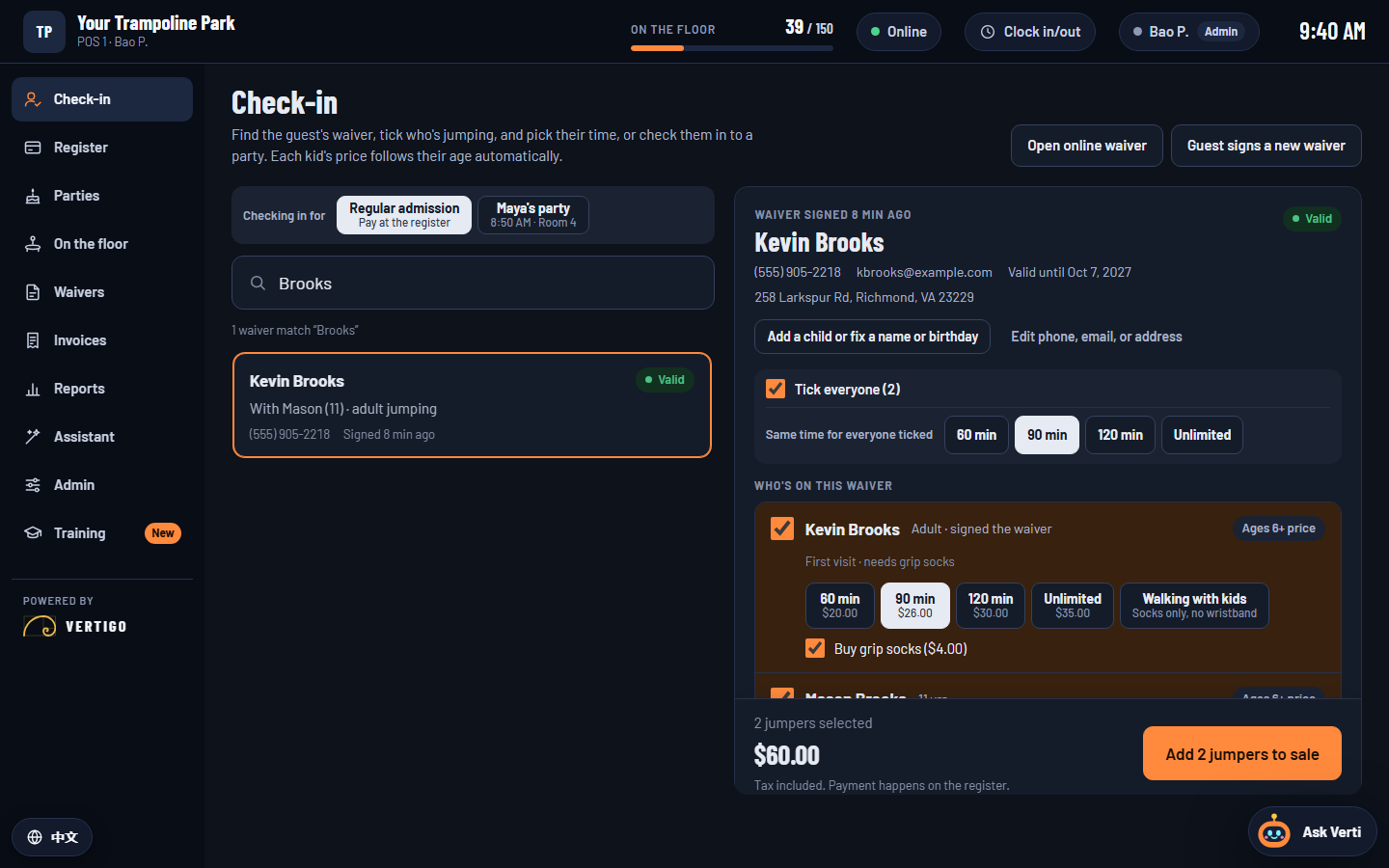
Vertigo's check-in screen: a family's waiver is open, both jumpers are ticked for 90 minutes, and the total is $60.00.

Made for how parks really run

Wristband colors that match your call-outs

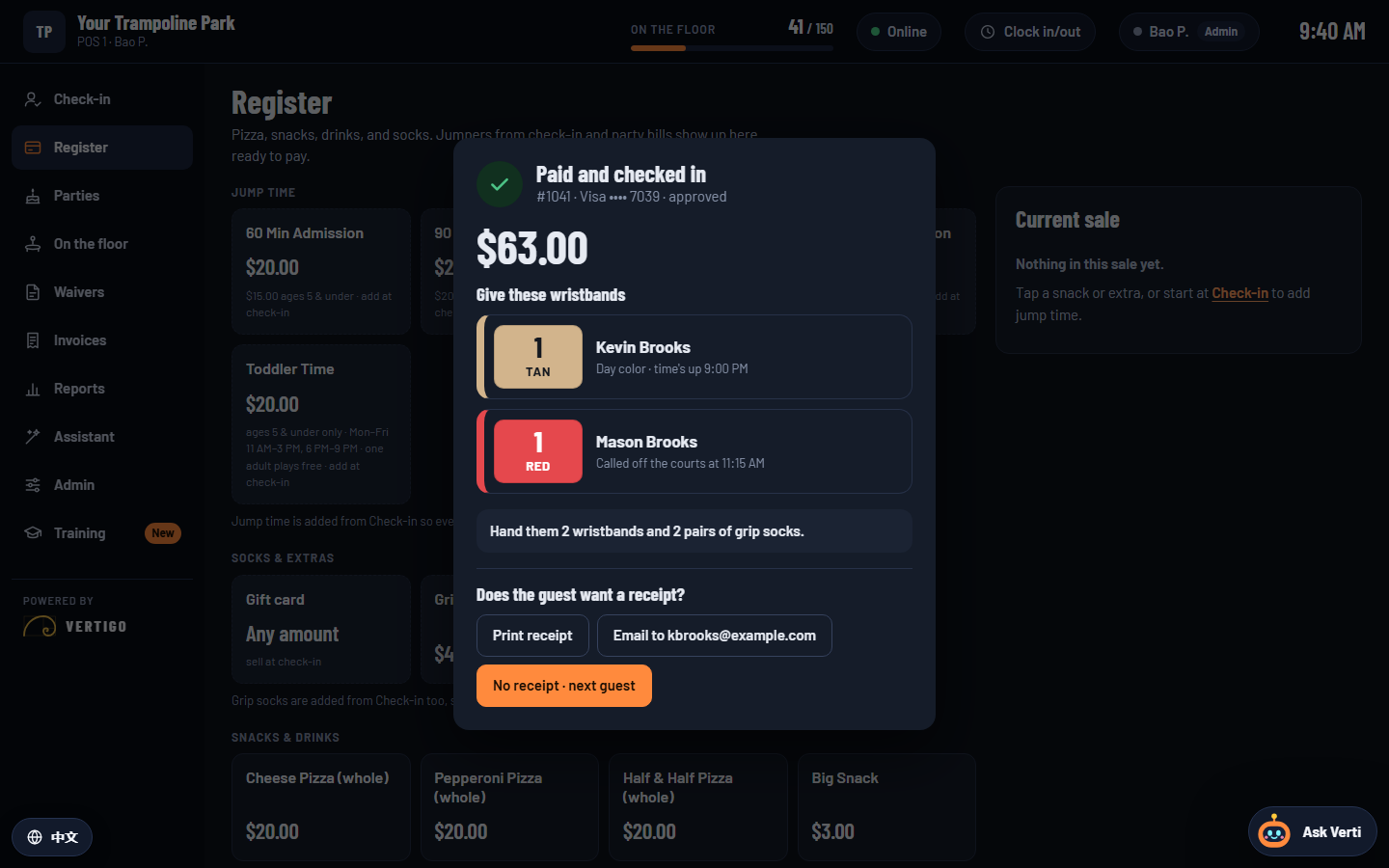
Every half hour, one color is called off the courts. Vertigo rounds each jumper's time up to the next call and tells staff which band to hand over, so nobody does the math at a busy desk.

Red11:15
Orange11:45
Yellow12:15
Green12:45
Blue1:15
Purple1:45
Pink2:15
TanAll day

Then Red again at 2:45, all day long. Unlimited and Toddler Time wear the day color. Your colors and call times are set in Admin.

After payment, Vertigo shows which wristband to give each jumper: a tan day-color band for Kevin Brooks and a red band for Mason Brooks, called off at 11:15 AM.

Check-in to wristband in one tap

Waiver first, then jump time

Staff find the family's waiver by name, phone or email, tick who's jumping and pick a time. Kids' prices follow their age on their own, and grip socks are only sold to people with a waiver on file.

  • Online waivers in English or Spanish, good for a year
  • Friends and parents on other waivers join the same sale
  • Everyone on the floor, with who's up next to come off
  • Keeps working when the internet drops. Cards wait for the bank, so a declined card shows at the register, never after.
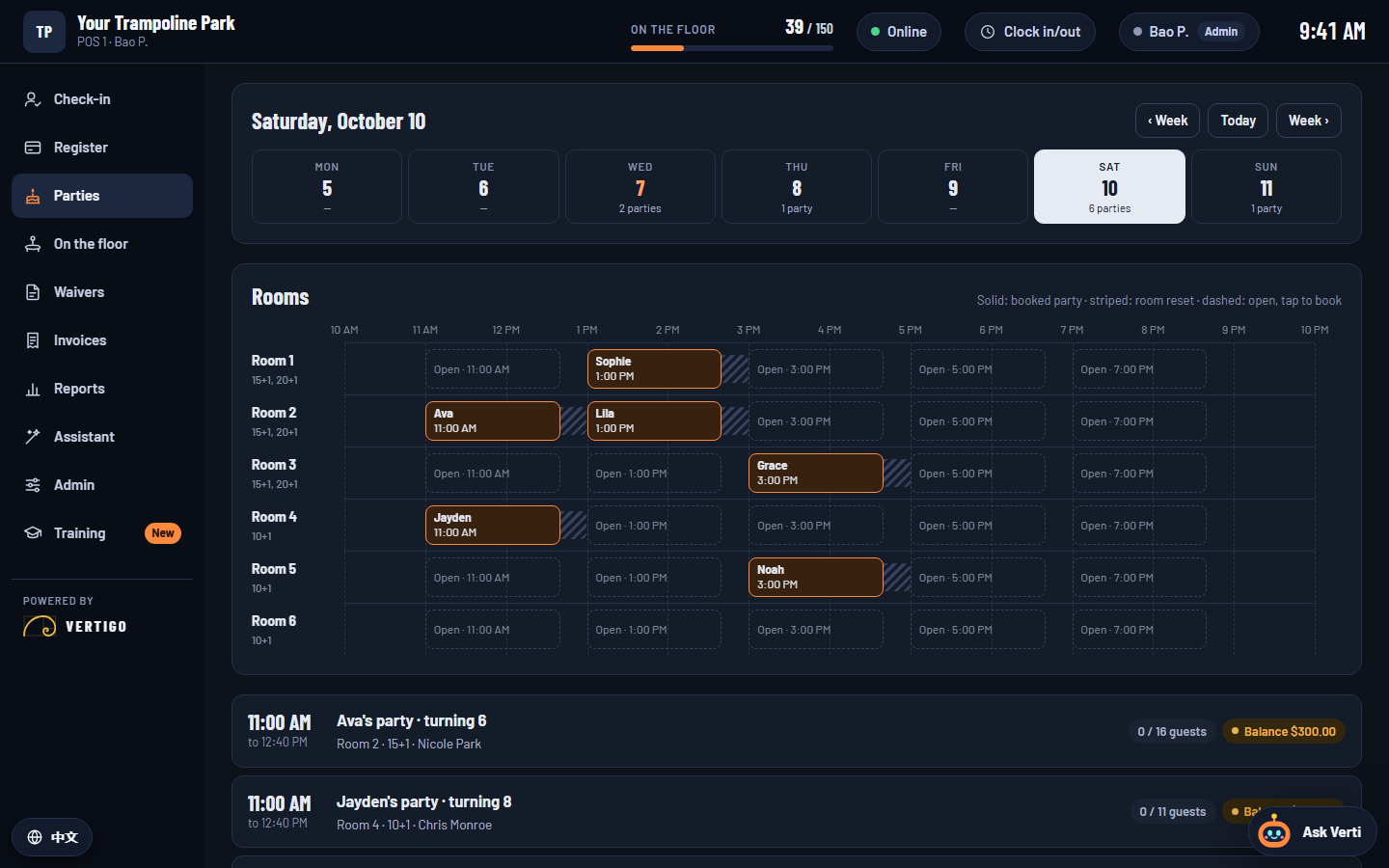
Vertigo's party rooms for a Saturday: six rooms on one timeline with booked parties, room reset time and open slots at 11, 1, 3, 5 and 7.

Birthday parties

Every room, every party, one timeline

Book at the desk or let families book online with a deposit. Guests join the party list with a Group ID when they sign their waiver, and check-in stays locked until the balance is paid.

  • Room reset time built into every booking
  • Move a party, change its package, or add an hour in the room
  • Room rentals and field trips for schools and camps
  • Extra guests and pizza go on the party bill automatically

Levels and demos

Three levels. Try any of them.

Every level runs in a web browser on the computers and tablets you already have. Start where you are and move up when you're ready; your data comes with you.

1Essentials

$89/register / month

The front desk and the register, done right.

Counter ordering that keeps the line moving.

  • Waivers and check-in
  • Jump times with kids' prices by age
  • Wristband colors by call-out
  • Who's on the floor and who's up next
  • Register with cash and card
  • Discounts and refunds with a manager's approval
  • Split payments
  • Daily sales and cash drawer counts
  • Products and prices
  • Staff logins
  • Counter orders with order numbers
  • Menu with options, like sizes and toppings
  • Dine-in, takeout and pickup
  • Register with cash and card
  • Discounts and refunds with a manager's approval
  • Split payments
  • Daily sales and cash drawer counts
  • Menu and prices
  • Staff logins
2Plus

$149/register / month

Parties, payroll and a team that runs itself.

Table service, the kitchen screen and your whole team.

Everything in Level 1, plus

  • Birthday parties: booking, calendar and guest lists
  • Party balance lock before the room
  • Room rentals and field trips
  • Gift cards
  • Time clock and payroll timesheets
  • Sales reports
  • Five access levels
  • Staff training with practice guests
  • Tables and floor plan
  • Open checks by seat
  • Kitchen screen
  • Tips and split checks
  • Gift cards
  • Time clock and payroll timesheets
  • Sales reports by item and server
  • Five access levels and staff training
3Pro

$229/register / month

Everything we make, with an assistant that knows your business.

Everything in Level 2, plus

  • Vertigo Assistant: ask about sales and timesheets in plain words, and change prices with a review before anything saves
  • Verti, a help bot for your staff that learns your desk
  • Staff screens in any language your team speaks
  • Reports that point out what needs your attention
  • Reservations and waitlist
  • 86 list and stock counts
  • Vertigo Assistant for sales and menu changes
  • Verti, a help bot for your staff
  • Staff screens in any language your team speaks

Custom

Need something built just for you?

Every business runs a little differently. Tell us what you need — a special report, a workflow, your own feature — and we'll build it and tailor a plan to fit.

Tell us what you need

Prices are per register, billed monthly. Add a register for $20/month. Move up a level anytime. Demos use example guests and prices, and nothing is charged.

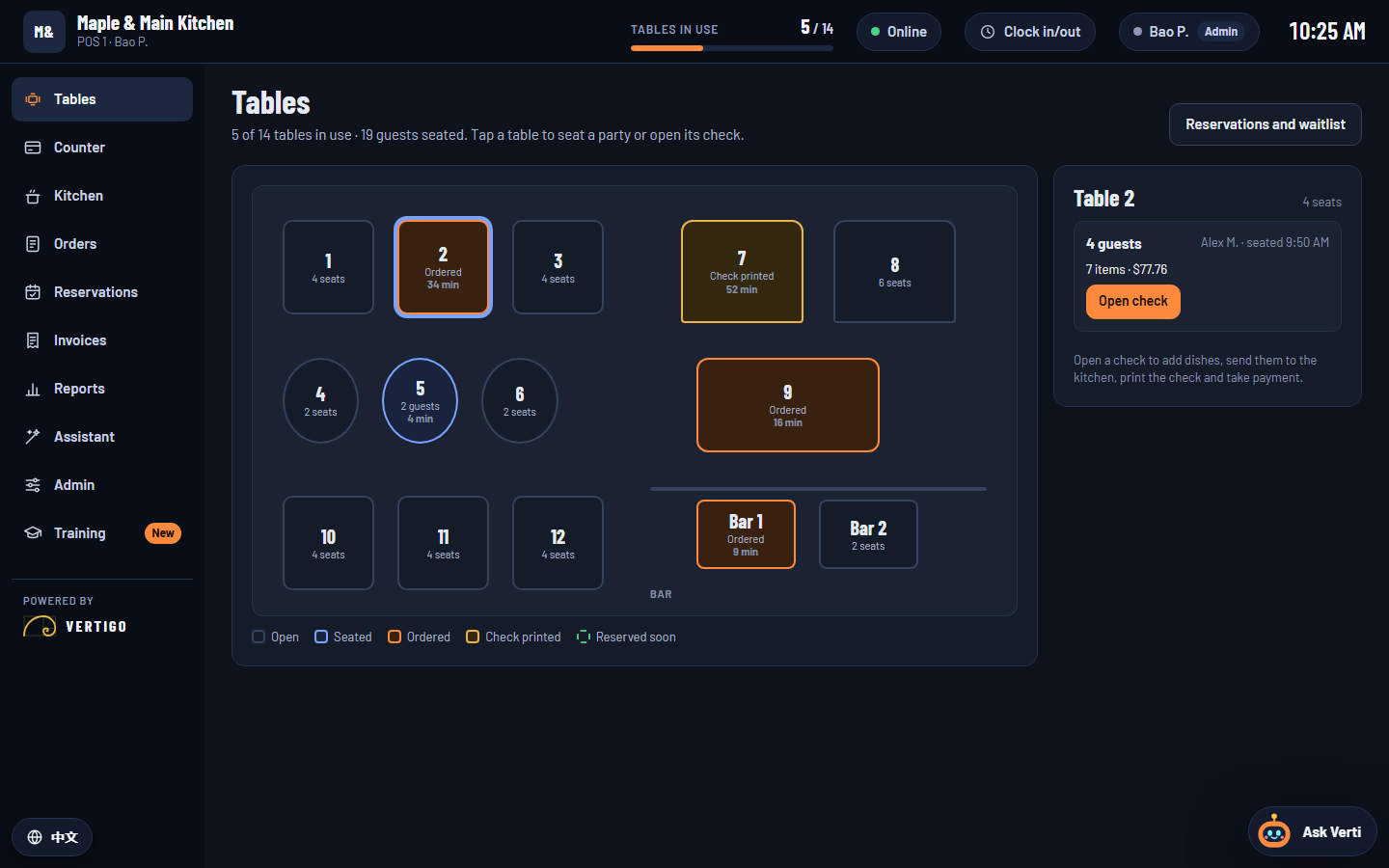
Vertigo's restaurant floor plan: fourteen tables and two bar seats, each showing if it's open, seated, ordered or has its check printed, with Table 2's open check beside it.

Restaurants

The same speed, for counters and dining rooms

Vertigo's restaurant style takes the register that keeps a park's line moving and adds what a kitchen needs: menus with options, order numbers, tables, a kitchen screen, tips and split checks. Pick it in the levels above.

  • Counter service and table service in one system
  • Orders go straight to the kitchen screen
  • Separate checks by seat, with tips by server
  • Reservations, a waitlist and an 86 list at Level 3
See restaurant levels

Getting started

From demo to your first day

  1. Try a demo

    Pick a level above and log in as any member of staff. Check in a family and book a party, or seat a table and send its order to the kitchen.

  2. We set it up for you

    Your prices, rooms or menu, staff and access levels go in before launch, and we bring over your signed waivers.

  3. Your team is ready

    Step-by-step guides and practice with pretend guests mean new staff learn the desk before their first shift.

Questions

What do we need to run it?

A computer or tablet with a web browser at each register, a card reader, and internet. There's nothing to install.

What happens when the internet goes down?

Check-ins, cash sales and the time clock keep working. Cards wait for the internet, because every card is checked with the bank right at the register, so a declined or locked card always shows before the guest leaves.

Can we bring our waivers from our old system?

Yes. During setup we move your signed waivers over, so returning guests don't have to sign again.

Can we change levels later?

Yes. Move up a level whenever you're ready. Your guests, sales and staff stay right where they are.

Is the demo real?

The demos run the real system with example guests and prices. Card payments are simulated, nothing is charged, and anything you do stays in your own browser.

Request a demo

Let's look at your front desk together

Tell us a little about your business. We'll walk you through the level that fits and put together a quote.